If you work with code, software, or computer files, you may see both YAML and YML. At first, these names can look like two different file types. This can make people ask: YAML or YML — which one is correct?
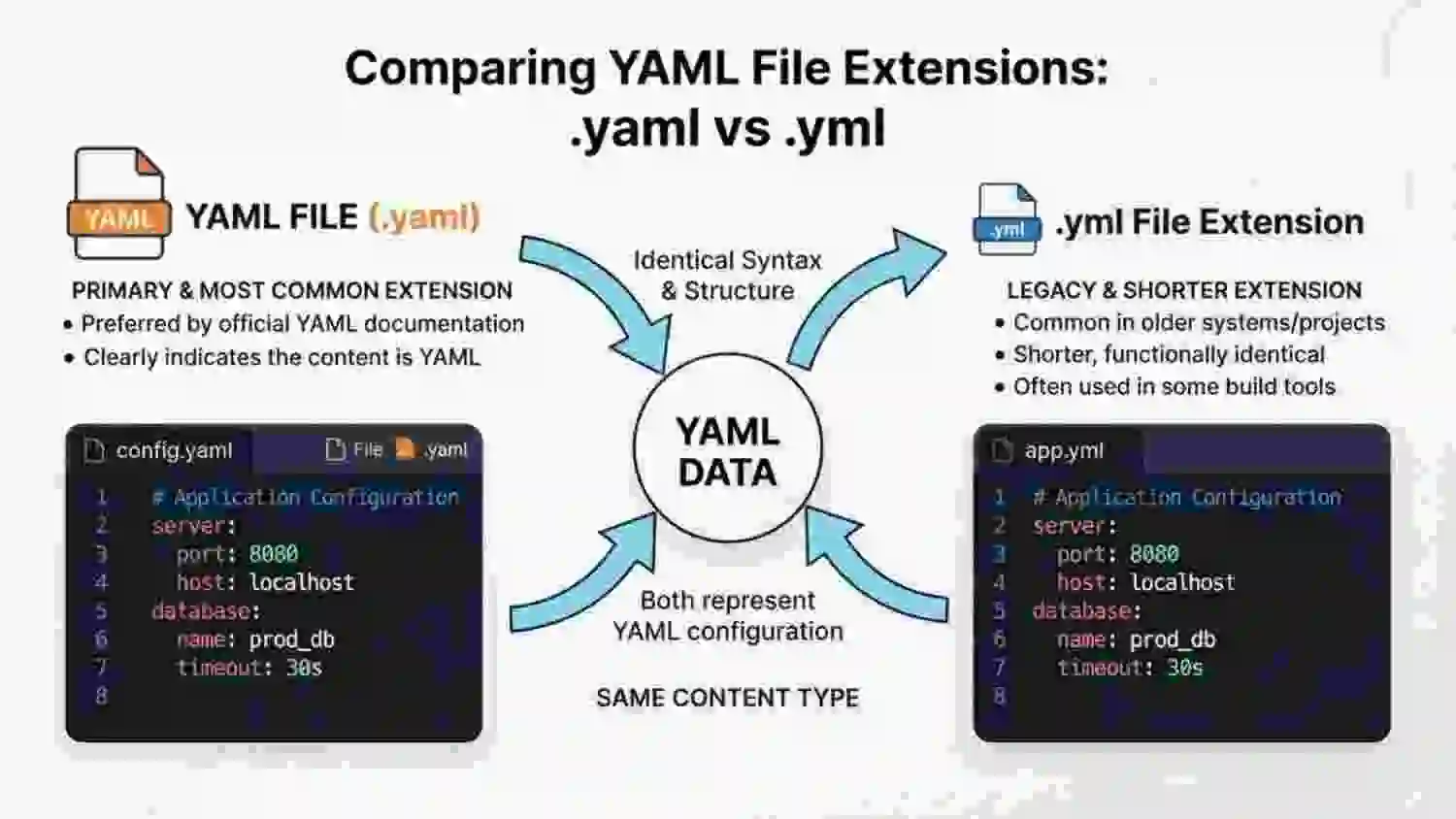
The good news is that the answer is simple. YAML and YML refer to the same data format. The main difference is the file extension used at the end of the file name.
For example, you may see:
- config.yaml
- config.yml
Both files can use the YAML format. The choice between .yaml and .yml often depends on the software, project, or coding style being used.
YAML is a simple format used to store data in a way that is easy for people to read. It is common in software settings, configuration files, automation tools, and development projects.
In this guide, you will learn what YAML means, why both .yaml and .yml exist, whether one is better, how to choose between them, and how to avoid common mistakes.
YAML or YML – Quick Answer
YAML and YML are the same data format.
The difference is only the file extension:
- .yaml = YAML file
- .yml = YAML file
For example:
config.yaml
and
config.yml
can both contain YAML data.
There is no different YAML language called “YML.” YML is simply a shorter file extension for YAML.
The most important rule is to follow the file name and extension expected by the tool or project you are using.
What Is YAML?
YAML is a human-readable data format.
The name originally stood for “Yet Another Markup Language.” Later, the name was changed to “YAML Ain’t Markup Language.”
YAML is made to be easy for people to read and write.
A simple YAML file can look like this:
name: John
age: 25
city: London
This example stores three pieces of data:
- Name: John
- Age: 25
- City: London
YAML uses spaces and simple symbols to show how data is organized.
You may see YAML in:
- Software settings
- App configuration
- Cloud tools
- Automation
- Development projects
- Data files
- CI/CD systems
- Docker and Kubernetes files
What Is YML?
YML is not a separate format.
It is a short form of the .yaml file extension.
For example:
settings.yml
is normally a YAML file.
You may also see:
settings.yaml
Both can contain YAML data.
The choice of .yml or .yaml does not normally change the data format inside the file.
YAML vs YML: The Main Difference
The main difference is the file extension.
| Feature | YAML | YML |
| Meaning | YAML data format | Short file extension for YAML |
| Common extension | .yaml | .yml |
| Data format | YAML | YAML |
| Human-readable | Yes | Yes |
| Different language? | No | No |
| Can store YAML data? | Yes | Yes |
| Main difference | Longer extension | Shorter extension |
So, when someone asks “Is YAML or YML correct?”, both can be correct when they refer to a YAML file.
Why Are There Two Extensions?
One reason is simple: file extensions have different length limits and traditions across older computer systems.
The .yml form became popular because some systems and projects preferred shorter file extensions.
The .yaml form is also widely used because it clearly matches the name YAML.
Today, you can find both forms in real software projects.
The important point is that .yml does not mean a different type of data.
YAML File Examples
Here are some common file names:
config.yaml
settings.yaml
database.yaml
docker-compose.yml
config.yml
settings.yml
The .yaml and .yml files can both contain YAML data.
For example, this:
name: Alice
language: English
can be stored in:
data.yaml
or:
data.yml
The extension alone does not change the YAML content.
Is YAML or YML Better?
There is no single rule that makes one extension correct for every project.
Instead, check the tool or project you are working with.
For example, if a project already uses:
config.yml
it may be best to keep using .yml for similar files.
If a project uses:
config.yaml
then .yaml may be the better choice for consistency.
A simple rule
Follow the convention of the project or tool.
This avoids confusion and keeps file names consistent.
YAML or YML in Programming
Developers use YAML for many types of configuration.
For example:
server:
host: localhost
port: 8080
This tells a program about a server host and port.
The same data could be saved as:
server.yaml
or:
server.yml
The contents are still YAML.
However, some tools may expect a specific file name. In those cases, you should use the exact name and extension required by the tool.
YAML or YML in GitHub
You may see YAML files in GitHub projects.
For example, GitHub Actions workflow files commonly use YAML files in:
.github/workflows/
You may see names such as:
build.yml
or:
deploy.yaml
The exact extension used depends on the project and the file’s purpose.
When working in an existing repository, check the files already used by the project and follow the same pattern.
YAML or YML in Docker
Docker-related files are another place where people may see .yml.
For example:
docker-compose.yml
This is a YAML file.
The file contains settings that describe services, networks, volumes, and other options.
The important part is not that .yml is a different format. It is still YAML.
Modern Docker Compose documentation also uses names such as compose.yaml, so the exact file name can depend on the tool and its current conventions.
YAML or YML in Kubernetes
Kubernetes configuration files also commonly use YAML.
For example:
deployment.yaml
may contain Kubernetes settings.
You may also find:
service.yml
in some projects.
Again, the data format is YAML.
The project or tool may have its own file naming rules, so always check the documentation when the exact name matters.
British English vs American English
There is no British English versus American English difference between YAML and YML.
These are technical terms and file extensions.
The spelling does not change based on the country.
You can use:
- YAML
- .yaml
- YML
- .yml
The key difference is the file extension, not English spelling.
Which One Should You Use?
If you are starting a new project, the best choice depends on the project and the tool you use.
For an existing project
Follow the style already used in the project.
If most files use:
.yaml
use .yaml.
If they use:
.yml
use .yml.
For a tool with a required name
Use the exact file name given in the tool’s documentation.
For example, if a tool expects:
config.yaml
do not rename it to:
config.yml
unless the tool says that both are supported.
For team projects
Consistency matters.
If your team has a file naming rule, follow it.
The main goal is to make files easy to find and understand.
Common Mistakes With YAML and YML
1. Thinking YML is a different language
Incorrect idea: YML is a separate language.
Correct: .yml is another common extension used for YAML files.
Example:
settings.yml
This can be a YAML file.
2. Changing the extension without checking the tool
Mistake:
required-config.yaml
is changed to:
required-config.yml
without checking whether the software accepts the new name.
Correct: Follow the tool’s file-name rules.
3. Mixing extensions without a reason
A project may contain both:
config.yaml
and:
settings.yml
This is not automatically wrong, but it can make a project less consistent.
4. Thinking .yaml means a newer format
The .yaml extension does not mean that the file contains a newer version of YAML.
Both extensions can represent YAML data.
5. Calling a YAML file “YML language”
Less clear:
“This is written in YML language.”
Better:
“This is a YAML file.”
YAML is the format name. .yml is a file extension.
YAML or YML: 10 Examples
- config.yaml is a YAML file.
- config.yml can also be a YAML file.
- YAML files are often used for configuration.
- The .yml extension is a common short form.
- The .yaml extension clearly matches the name YAML.
- Always check the tool’s required file name.
- A .yml file can contain YAML data.
- A .yaml file can contain YAML data.
- Project rules may tell you which extension to use.
- YAML and YML do not represent two different data formats.
Real-Life Usage
In software projects
A developer may create:
config.yaml
to store application settings.
In GitHub projects
A project may use:
build.yml
for an automation workflow.
In Docker projects
You may see:
compose.yaml
or other YAML-based configuration files.
In Kubernetes
A project may contain:
deployment.yaml
for Kubernetes configuration.
In team documentation
A developer may say:
“Please update the YAML file.”
This normally refers to a file using either .yaml or .yml.
Related Search Questions
Is YAML the same as YML?
Yes. YAML is the data format, while .yml is a common file extension used for YAML files.
Is .yml or .yaml correct?
Both extensions can be used for YAML files. The right choice depends on the project or tool you are using.
Is YML short for YAML?
Yes. .yml is a shorter file extension commonly used for YAML files.
Can I rename .yml to .yaml?
Often, yes, because both can represent YAML files. However, check the software or project rules first. Some tools expect a specific file name.
Can a YAML file have a .yml extension?
Yes. A YAML file can use .yml as its extension.
YAML or YML: Usage and Search Trends
People often search for “yaml or yml” when they start working with configuration files or see both extensions in software projects.
Common search questions include:
- YAML or YML?
- Is .yml the same as .yaml?
- Which YAML extension should I use?
- Is .yaml better than .yml?
- Can I rename .yml to .yaml?
- What does .yml mean?
- What is a YAML file?
Exact search volume and Google Trends numbers should not be added without reliable current data. Search interest can also change by tool, programming language, and project type.
The key usage point is simple: both .yaml and .yml are used for YAML files.
Comparison Table
| Term | Meaning | Usage | Example |
| YAML | Name of the data format | Configuration and data | YAML file |
| .yaml | Full file extension | YAML files | config.yaml |
| YML | Common short form | Informal name for .yml files | YML file |
| .yml | Short file extension | YAML files | config.yml |
FAQs
1. Which is better, YAML or YML?
YAML is the name of the format. .yaml and .yml are both file extensions used for YAML files. For a project, the best choice is usually the extension required by the tool or the one already used by the team.
2. Is .yml outdated?
No. .yml is still used in many software projects. It is not simply an old or invalid form of YAML. The exact extension used depends on the project and tool.
3. Is .yaml more correct than .yml?
Neither extension makes the YAML data itself different. .yaml is the full extension, while .yml is a shorter common extension. Always follow the rules of the software or project you are using.
4. Can YAML use both .yaml and .yml?
Yes. YAML data can be stored in files ending in either .yaml or .yml. However, a specific program may look for one exact file name, so the tool’s rules still matter.
5. What does YML stand for?
YML is commonly used as a short name for the .yml file extension. The actual format is called YAML. It is not a separate data language from YAML.
6. Why do people use .yml instead of .yaml?
The .yml extension is shorter and has been used by many software projects for years. Some tools and projects also use it as their standard file extension. In other projects, .yaml is preferred.
7. Should I use YAML or YML in a new project?
Check the tool and the project’s style first. If there is no rule, choose one extension and use it consistently. This makes your project easier to read and manage.
Conclusion
The difference between YAML or YML is much simpler than it may first seem. YAML is the name of the data format, while .yaml and .yml are file extensions used for YAML files.
For example, both of these can be YAML files:
config.yaml
and:
config.yml
The extension does not create a new data format. Instead, the choice often comes from a project’s style, a software tool, or a required file name.
If you work on an existing project, look at the other configuration files and follow the same pattern. If a tool’s documentation gives you a required file name, use that exact name.
For a new project, consistency is more important than trying to treat one extension as a completely different format.
The easiest way to remember the difference is:
YAML = the data format
.yaml = full file extension
.yml = short file extension
So, when you see YAML vs YML, remember that they normally point to the same YAML format.

Ethan Carter is a language writer at Wordellect who helps readers understand word differences, grammar rules, and spelling variations through simple and accurate guides.