You’re ready to build a website. You open a tab to look things up. In five minutes, you have ten tabs open, each with a different opinion. WordPress this. Webflow that. Everyone loves their own pick, and that just makes the choice feel harder.
Here’s the truth. Both tools are great. The right one just depends on what you’re building, and how much you want to deal with the tech side of things.
The Fast Answer
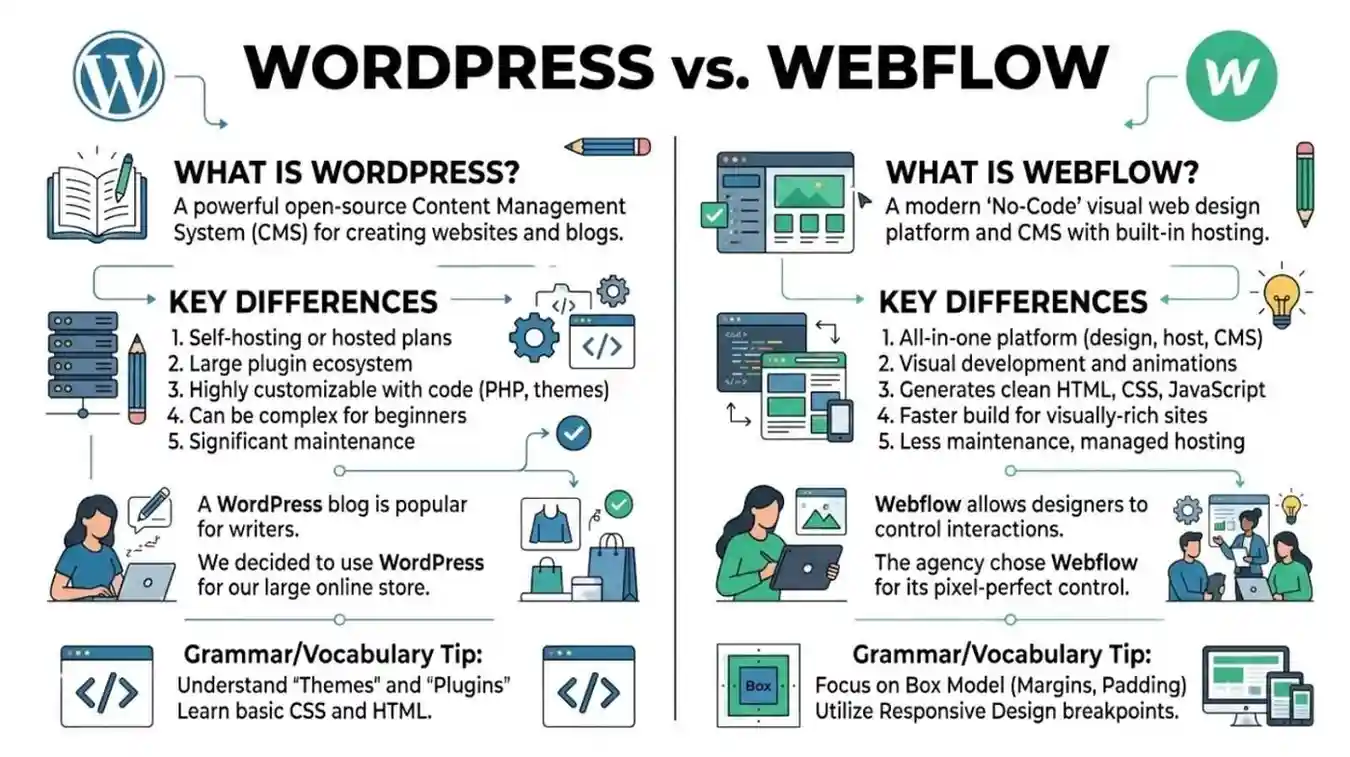
WordPress is an open, flexible tool. It runs a huge part of the internet. It works well for almost any kind of site, from blogs to online shops to big business sites.
Webflow is a visual design tool. It lets you build clean, modern sites by dragging and dropping. No need to touch code.
- “We built our blog on WordPress since we needed a lot of tools.” (flexible, powerful)
- “We used Webflow for our portfolio site since we wanted full design control.” (visual, clean)
Neither one wins every time. It comes down to what you’re building, and how you like to work.
Why This Choice Feels So Confusing
Both tools let you build a real, working site.Both have loud fans online, which is part of why the debate feels so noisy. But once you look past the noise, the two tools work in pretty different ways.
WordPress gives you a base. Then it lets you add almost anything on top, through tools called plugins. Webflow gives you a clean, visual space with full design control, right from the start, without needing extra tools for most things.
What WordPress Is Good At
WordPress has been around a long time. You can tell, since there’s so much you can do with it. Need an online shop? There’s a plugin for that. Need a members-only site, or a booking system? There’s a plugin for that too. This wide range is a big reason why so much of the internet still runs on it.
It’s also very cheap to start with, since the base software is free. You just need hosting, and maybe a few paid tools or themes.
The downside? With that much choice comes more moving parts. Updates, safety, and tool conflicts are things you’ll need to manage, or pay someone else to manage for you.
What Webflow Is Good At
Webflow feels like designing right inside your web browser. You get full control over how everything looks, without writing code. The final result often feels clean, modern, and polished right away.
It also handles hosting and updates for you, all in one place. No tool conflicts. No separate hosting company to deal with. Everything lives under one roof.
The downside? It can cost more as your site grows. It’s also not as flexible for very complex features, like a huge online shop with lots of custom parts.
Side-by-Side Comparison
| WordPress | Webflow | |
| Design control | Depends on theme and tools | Very high, built right in |
| Flexible features | Very high, through plugins | Good, but more limited |
| Easy for beginners | Takes some time to learn | Easier for visual design |
| Hosting | Separate, you pick it | Built-in, all in one place |
| Best for | Blogs, shops, big sites | Portfolios, marketing sites |
| Starting cost | Free base software | Paid plans, free trial |
So Which One Should You Pick?
If you’re building something that needs a lot of custom tools, like a big online shop, a members site, or a large blog, WordPress usually gives you more room to grow and more tools to use.
you’re building a marketing site or a portfolio, where the look really matters and you want full control without touching code, Webflow tends to feel smoother to work in.
If you’re not very tech-savvy and just want something that looks good fast, Webflow’s drag-and-drop system usually feels easier at first. If you think you’ll need a lot of custom tools later, WordPress gives you more room to grow over time.
Mistakes People Often Make
Picking based on what’s popular, not what fits the job. Both tools are great. The real question is always what your site actually needs.
Not thinking about how much there is to learn. WordPress has more parts to learn. Webflow has its own design logic that takes some time too.
Not planning for growth. If you think your site will grow big and complex, plan ahead before you build.
Ignoring long-term cost. WordPress can be cheap at first, but tools, themes, and hosting add up. Webflow’s cost is more steady, but it can rise as your site grows.
Real-Life Examples
In a freelancer’s notes: “I moved my portfolio to Webflow last year, and the design freedom is amazing.”
In a small business owner’s notes: “We run our online shop on WordPress. It just gives us everything we need.”
Work team chat: “Let’s build the new landing page in Webflow, we can make it look sharp fast.”
In a blogger’s setup notes: “WordPress was the easy pick for us since we needed strong SEO tools and a huge content library.”
What People Are Actually Searching For
Most people comparing these two fall into a few groups. Some are small business owners trying to find the easiest way to get a nice-looking site up fast. Others are workers or agencies trying to figure out which tool saves more time on a client job.
A lot of interest also comes from people who started on one tool and now wonder if they made the right choice, or if switching would fix their problems.
Frequently Asked Questions
Is Webflow easier to learn than WordPress? For pure design, most people find Webflow easier at first. WordPress has more depth, which means more to learn if you want its full power.
Can I sell things on both platforms? Yes. WordPress uses a tool called WooCommerce for this. Webflow has its own built-in shop tools too.
Which one is better for search rankings? Both can do well. WordPress has more special tools for this. Webflow’s clean setup often helps sites load fast, which also helps with search rankings.
Is one platform cheaper overall? It depends on your needs. WordPress can start cheap but grow in cost with paid tools and hosting. Webflow has clear, steady plans that can rise as you need more.
Can I switch from one to the other later? Yes, though it means rebuilding your site, since the two tools work in very different ways behind the scenes.
The Bottom Line:
WordPress or Webflow? There’s no single right answer here. It’s just about the better fit for your project. WordPress gives you huge flexibility and a massive toolbox, great for sites that need to grow and do a lot. Webflow gives you clean, visual design control and an all-in-one setup, great for polished, design-first sites.
Think about what your site really needs to do, how much tech work you want to deal with, and how much room you want for growth later. That’s really the whole choice, once you clear away the noise.

Ethan Carter is a language writer at Wordellect who helps readers understand word differences, grammar rules, and spelling variations through simple and accurate guides.