Choosing between WAV or FLAC can be confusing if you want high-quality audio. Both formats can store audio without the quality loss found in common lossy formats such as MP3. However, WAV and FLAC work in different ways.
WAV is best known for storing PCM audio with little or no compression. This gives you a simple format that many audio programs can read. The trade-off is file size. WAV files can become very large, especially when you use high sample rates or bit depths. Microsoft notes that WAV is a container and can hold different types of audio, although uncompressed PCM is very common.
FLAC stands for Free Lossless Audio Codec. It uses lossless compression to make audio files smaller while keeping the original audio data intact. When decoded, the audio is bit-for-bit the same as the source PCM data.
So, which should you use? The answer depends on what you need. WAV is useful for recording, editing, and professional audio work. FLAC is useful when you want high-quality audio with smaller files.
WAV or FLAC – Quick Answer
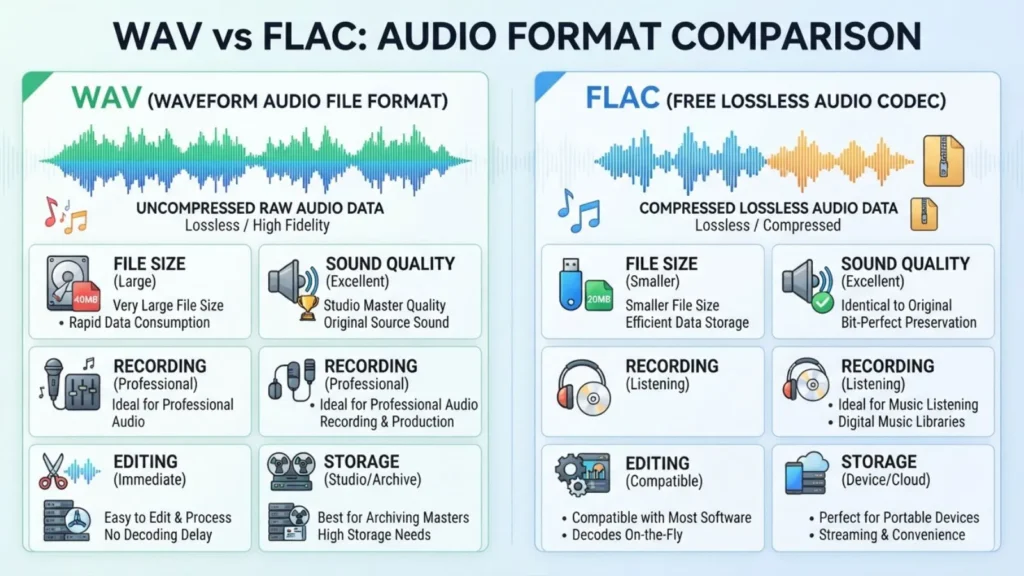
WAV and FLAC can both preserve high-quality audio, but FLAC usually takes less storage space.
- WAV: Usually stores uncompressed PCM audio and creates larger files.
- FLAC: Compresses PCM audio without losing audio information.
- WAV: Common in recording and editing workflows.
- FLAC: Great for music libraries and long-term storage when you want smaller files.
- Sound quality: A lossless FLAC file can reproduce the same PCM audio data as its source.
If you are editing or recording audio, WAV is often a practical choice. If you are storing or listening to music and want to save space, FLAC is often more convenient.
What Is WAV?
WAV, or Waveform Audio File Format, is an audio file format and container. It can hold different audio data types. One of the most common is Linear PCM, which is uncompressed audio.
WAV files are widely used in audio production. They can store high-resolution audio and are supported by many recording and editing programs.
A WAV file can become large because uncompressed PCM stores a lot of audio data. File size depends on factors such as sample rate, bit depth, number of channels, and recording length.
What Is FLAC?
FLAC means Free Lossless Audio Codec. It is designed to compress PCM audio without losing information.
The word lossless is the key. FLAC does not remove audio information in the way lossy formats do. When you decode a FLAC file, the original PCM data can be recovered exactly.
This makes FLAC useful when you want high-quality audio but do not want to keep very large uncompressed files.
WAV vs FLAC: Main Differences
The biggest difference is how the audio data is stored.
WAV
WAV is a container. A common WAV file uses uncompressed PCM audio. This makes the file easy to work with, but it can take a lot of space.
FLAC
FLAC is a lossless compression format. It reduces the size of the audio data while keeping the original information.
The important point is that lossless compression is not the same as lossy compression. FLAC does not work like MP3. It does not throw away parts of the audio to make the file smaller.
WAV vs FLAC Comparison Table
| Feature | WAV | FLAC |
| Full name | Waveform Audio File Format | Free Lossless Audio Codec |
| Main use | Recording, editing, production | Music storage and playback |
| Compression | Often uncompressed PCM | Lossless compression |
| Audio information | Can preserve full PCM data | Preserves PCM data losslessly |
| File size | Usually larger | Usually smaller |
| Editing | Very common | Supported by many modern tools |
| Music storage | Uses more space | Saves storage space |
| Quality loss | None with uncompressed PCM | No loss from FLAC compression |
| Metadata | Supported, but depends on WAV type and chunks | Strong metadata support |
| Best use | Audio production and working files | High-quality music libraries |
Is WAV Better Quality Than FLAC?
Not necessarily.
A WAV file containing uncompressed PCM and a FLAC file made from the same PCM source can contain the same audio information. FLAC simply stores that information more efficiently.
For example, if you convert a WAV file to FLAC using lossless compression, you do not automatically lose audio quality. The decoded FLAC can reproduce the original PCM data.
So, choosing WAV does not automatically mean better sound.
The actual audio quality depends on things such as:
- Sample rate
- Bit depth
- Number of channels
- The original recording
- The mastering or processing
- Whether the source was already lossy
The file extension alone does not determine sound quality.
Is FLAC Smaller Than WAV?
Usually, yes.
WAV commonly stores PCM audio without compression, while FLAC uses lossless compression. This means FLAC can reduce the amount of storage needed while keeping the audio data intact.
The exact size difference varies. Some audio files compress more than others.
Do not expect every FLAC file to have one fixed percentage of the size of a WAV file.
WAV or FLAC for Music?
For a personal music library, FLAC can be a very useful choice.
It gives you lossless audio while reducing storage needs compared with uncompressed PCM. This can matter when you have hundreds or thousands of songs.
For example, you may choose FLAC when you want to:
- Keep a high-quality music collection
- Save disk space
- Keep lossless audio
- Store music for long-term use
- Avoid lossy compression
WAV or FLAC for Recording?
WAV is very common for recording and production work.
Many recording systems and audio programs work naturally with WAV files. The Library of Congress also lists WAVE as a preferred format for certain digital audio preservation needs, including PCM WAVE and Broadcast WAVE formats.
WAV can be a practical choice when you need to record, edit, process, and move audio between professional programs.
However, the best format can depend on the software and workflow you use.
WAV or FLAC for Audio Editing?
WAV is often a simple choice for audio editing.
Editors and recording programs commonly support WAV, and uncompressed PCM makes the file straightforward to process.
FLAC can also be edited or converted by many modern audio tools, but support can vary between programs and workflows.
If you are working on a recording project, check what format your recording software, DAW, or production team expects before choosing a final format.
WAV or FLAC for Storage?
FLAC is often more convenient for storage because it uses lossless compression.
You can keep high-quality audio without storing all of the data in an uncompressed form.
For archival work, the exact choice can be more complex. The Library of Congress lists both uncompressed PCM WAVE and lossless compressed formats in its audio format guidance, with its preferred choice depending on the preservation context.
This means there is no universal rule that one format is always the right choice for every archive.
Origin and History
WAV is based on the RIFF file structure and is used to store waveform audio data. Microsoft documentation describes WAVE as a RIFF-based format and documents PCM audio within the format.
FLAC was created as a lossless audio codec. Its goal is to reduce file size while keeping the original PCM audio information. The FLAC specification is openly documented and is now described in IETF RFC 9639.
The two formats therefore solve slightly different problems.
WAV provides a widely used container for audio data. FLAC focuses on efficient lossless compression.
British English vs American English
There is no meaningful British English vs American English difference between WAV and FLAC.
Both are technical names and acronyms used in the same way in American and British English.
You may see:
- WAV file
- WAV audio
- FLAC file
- FLAC audio
- lossless FLAC
- WAV format
The pronunciation and meaning do not change based on English variety.
Which One Should You Use?
Your choice depends on what you are doing.
Choose WAV if you:
- Record audio
- Edit audio often
- Work in a DAW
- Need an uncompressed PCM working file
- Need a format widely used in production
- Are following a workflow that specifically asks for WAV
Choose FLAC if you:
- Store music
- Want lossless audio
- Want smaller files
- Build a large music library
- Want to reduce storage use
- Do not need an uncompressed working file
For many listeners, FLAC offers a useful balance between audio quality and file size.
For recording and production, WAV is often a simple and widely supported option.
Common Mistakes About WAV and FLAC
1. Mistake: FLAC is a lossy format
Incorrect: “FLAC removes some sound to make the file smaller.”
Correct: FLAC uses lossless compression.
Why: Lossless compression keeps the original audio information intact.
Example: A FLAC file can be decoded back to the same PCM audio data.
2. Mistake: WAV always means uncompressed audio
Incorrect: “Every WAV file is uncompressed.”
Correct: WAV is a container and can hold different kinds of audio data.
Why: WAV files commonly contain PCM, but the format can also contain other codecs.
3. Mistake: WAV always sounds better than FLAC
Incorrect: “WAV has better sound because it is bigger.”
Correct: WAV and FLAC can represent the same PCM audio without a quality difference caused by FLAC compression.
4. Mistake: FLAC is the same as MP3
Incorrect: “FLAC and MP3 both reduce audio quality.”
Correct: FLAC is lossless, while MP3 is a lossy format.
5. Mistake: A bigger file always has better quality
Incorrect: “The biggest audio file must sound best.”
Correct: File size alone does not tell you the quality of the recording.
Sample rate, bit depth, source quality, and other factors also matter.
6. Mistake: Converting MP3 to FLAC restores lost quality
Incorrect: “If I convert an MP3 to FLAC, I get the original quality back.”
Correct: FLAC cannot restore audio information that a lossy source already removed.
Converting a lossy file to FLAC can make a larger file, but it does not recreate missing information.
Everyday Examples
- I keep my music collection in FLAC to save space.
- The studio gave me the recording as a WAV file.
- This FLAC file has the same source audio data after lossless decoding.
- WAV files can take up a lot of storage.
- I converted my WAV files to FLAC for my music library.
- The editor asked for a WAV file.
- FLAC is useful when I want lossless music without very large files.
- The recording was saved as 24-bit WAV.
- I use FLAC for music and WAV for project files.
- Check whether your player supports FLAC before moving your music collection.
Real-Life Usage
In conversations
You may hear someone say:
“Do you have the WAV or FLAC version?”
They are asking which audio file format you have.
At school
A student working on an audio project may use WAV because the editing software supports it well.
At work
A sound editor may receive WAV files from a recording session and process them in an audio program.
In music libraries
A listener may choose FLAC to keep a lossless music collection while using less storage than uncompressed WAV files.
In formal audio work
Broadcast WAVE can be useful when extra metadata and professional preservation features matter. The Library of Congress uses Broadcast WAVE as an archival master format for some audio preservation work.
Related Search Questions
Is WAV or FLAC better?
Neither format is always better. WAV is often useful for recording and editing, while FLAC is useful for lossless storage with smaller files.
Does FLAC lose audio quality?
No. FLAC uses lossless compression. When properly decoded, it can reproduce the original PCM audio data bit-for-bit.
Is WAV lossless?
A WAV file containing uncompressed PCM does not use lossy compression. However, WAV itself is a container and can hold different types of audio data.
Can FLAC replace WAV?
For many listening and storage needs, yes. But production software or a specific workflow may require WAV, so check the requirements before converting.
Can you convert WAV to FLAC without losing quality?
Yes. Converting uncompressed PCM WAV to FLAC can preserve the audio data because FLAC uses lossless compression.
Does converting FLAC to WAV improve sound?
No. If the FLAC contains the same lossless PCM data, converting it to WAV does not create extra sound quality.
Which takes more space, WAV or FLAC?
A typical uncompressed PCM WAV file takes more space than its FLAC version. The exact difference depends on the audio.
Usage and Search Trends
There is no reliable search-volume or Google Trends figure included here, so exact numbers should not be claimed.
The terms WAV, FLAC, lossless audio, audio quality, uncompressed audio, and audio file format are commonly connected because people often compare these formats when choosing how to record, store, edit, or listen to digital audio.
For technical work, the exact file requirements matter more than a simple “WAV vs FLAC” rule.
WAV vs FLAC at a Glance
| Feature | WAV | FLAC |
| Type | Audio container | Lossless audio codec |
| Common audio | PCM | PCM encoded with FLAC |
| Compression | Often none | Lossless |
| Quality loss from format | None with uncompressed PCM | None from lossless compression |
| File size | Usually large | Usually smaller |
| Recording | Very common | Possible, depending on software |
| Editing | Very common | Software dependent |
| Music storage | Good | Very good |
| Long-term storage | Useful | Useful |
| Best known for | Production and uncompressed audio | Efficient lossless storage |
FAQs
Is WAV higher quality than FLAC?
No. If a WAV contains the same PCM audio that a FLAC represents, FLAC compression does not reduce that audio information. FLAC simply stores the data more efficiently. The original recording and its technical settings matter more than the file extension.
Why is FLAC smaller than WAV?
FLAC uses lossless compression. It finds ways to represent the audio data more efficiently while keeping the information needed to reproduce the original PCM data. WAV commonly stores PCM without compression, so it generally needs more space.
Should I convert WAV to FLAC?
You can convert WAV to FLAC if you want to reduce storage space while keeping the audio lossless. This can work well for music libraries. Before converting production files, make sure your editing software or client accepts FLAC.
Should I use WAV or FLAC for music?
FLAC is often a practical choice for a personal lossless music library because it can save space. WAV can also store high-quality audio, but its larger file size can make large music libraries less convenient.
Is FLAC good for professional audio?
FLAC can be useful in some professional workflows, but WAV is widely used for recording and production. The correct choice depends on the software, client, studio, and delivery requirements.
Does FLAC sound better than MP3?
FLAC preserves audio information through lossless compression, while MP3 uses lossy compression. If you compare a FLAC source with a properly encoded MP3 at a lower bitrate, they can differ, but the audible result depends on the source and encoding settings.
Can WAV and FLAC have the same sound?
Yes. A FLAC file can represent the same PCM audio data as a WAV source. Lossless decoding restores the same audio data, so the FLAC format itself does not add a quality loss.
Conclusion
When comparing WAV or FLAC, the main difference is how the audio data is stored.
WAV is a widely used audio container. WAV files often contain uncompressed PCM audio, which makes them useful for recording, editing, and production. The trade-off is that uncompressed audio can take a lot of storage space.
FLAC takes a different approach. It uses lossless compression, so it can make audio files smaller without removing the original PCM audio information. A properly decoded FLAC file can reproduce the source audio data exactly.
For music storage, FLAC can be a convenient way to keep high-quality audio while using less space. For recording and production, WAV remains a common and practical format.
The best choice depends on your goal. Use WAV when your workflow needs an uncompressed or widely supported production format. Use FLAC when you want lossless audio with more efficient storage.

Ethan Carter is a language writer at Wordellect who helps readers understand word differences, grammar rules, and spelling variations through simple and accurate guides.